
What's New: Canvas Deliverables, Smarter Research, Auto Contacts & Full-Book Views

Four updates this week: Canvas conversations now produce finished deliverables, automatic account research covers broader ground by default, new accounts auto-discover the buying team, and Command Center shows both your priorities and your full book of business.
Canvas now returns tables, docs, and files inline
Canvas can now return documents, tables, spreadsheets, and CSVs as part of the same response — no follow-up prompt needed.
Ask Canvas to build a target account list, compare competitors across a set of criteria, or pull together a prospecting sheet, and you'll see the result directly in the conversation. Tables and CSV previews render inline so you can review them on the spot. When the output is a file, it appears as an attachment you can view or download in one click.
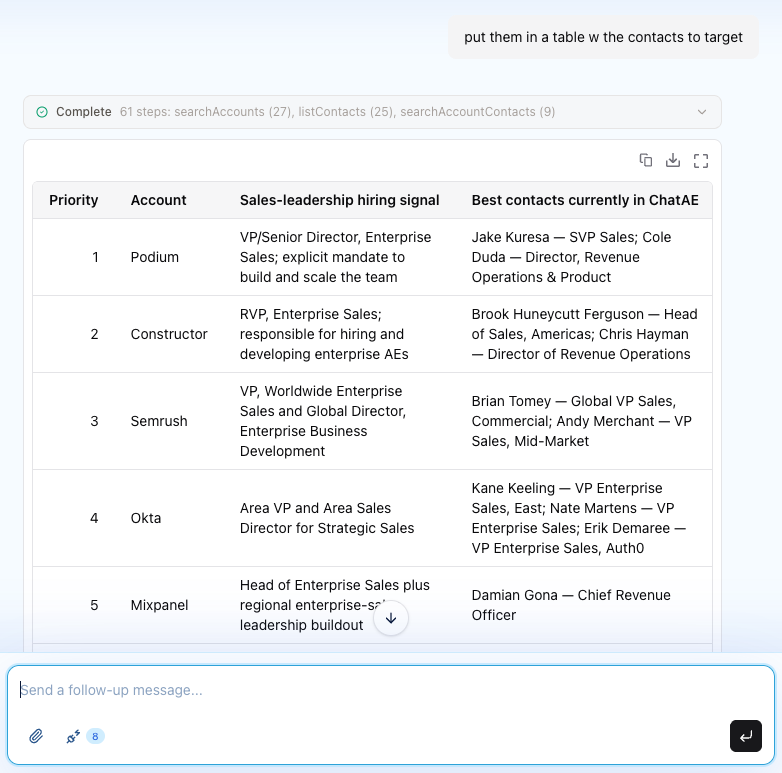
Less hunting for files, fewer follow-up prompts, and a much shorter path from idea to finished work.
Automatic account research now covers more ground
When accounts are added or found, ChatAE now automatically runs research that covers broader ground by default — recent company news, leadership and executive changes, funding and M&A activity, hiring into relevant functions, and strategic priorities.
When you refresh research on an account, ChatAE preserves your original brief and adds a focused "What's new" section only when meaningful changes are found. You keep the full picture from your first look and immediately see what moved since then — no need to re-read the entire brief to spot the difference.
Staying current on active accounts no longer means starting over.
New accounts automatically find senior buyers
When you add or begin tracking an account, ChatAE can now launch an initial contact search for relevant senior buyers automatically.
The roles it targets are informed by your seller profile — not a generic title list — so the contacts it surfaces are VP, C-level, Head, and Director roles that actually matter for your sales motion. You get a head start on building the buying committee without a separate research step.
Command Center now shows your full book of business
Command Center now supports both priority-focused and complete views across your book of business:
- All Accounts — see every tracked account, ranked by ChatAE account score.
- Contacts to Engage — switch between Priority Accounts and All Contacts to decide where to focus outreach.
- Contact Gaps — toggle between Priority Accounts and All Accounts to surface coverage gaps across your entire book.
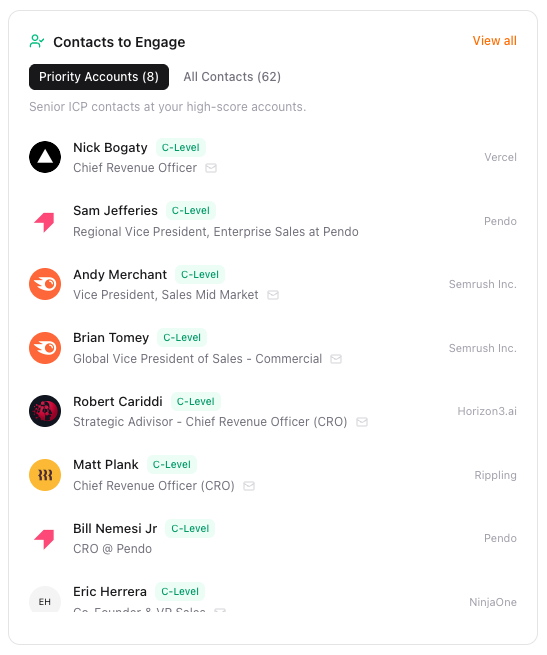
Zoom into your highest-priority accounts when you need to act fast, then pull back to the full view when you're planning or reviewing coverage — all without leaving Command Center.
Try it out
All four updates are live today. If you're not on ChatAE yet, start your free trial and see them in action. If you're already a customer, open Canvas, refresh an account's research, add a new account, or explore the new views in Command Center. Questions? Reach out — we'd love to hear from you.