
Using AI to Automate SDR Admin Work
SDRs Have an Admin Problem
The average SDR spends less than a third of their day actually selling. The rest goes to research, data entry, tool switching, email writing, CRM updates, and preparing for conversations they barely have time to execute.
This isn't a discipline problem. It's a systems problem. The tools SDRs use were designed for reporting and pipeline management — not for eliminating the manual work that sits between a rep and a conversation.
AI changes this. Not by replacing the SDR (that's the AI SDR approach, and it produces spam at scale). Instead, AI can automate the administrative layer — the work that eats time but doesn't require human judgment — so SDRs can spend their hours on the work that does.
Here are the six admin tasks AI can automate for SDRs, what to look for in a solution, and the traps to avoid.
1. Account Research
The problem: SDRs manually research accounts before outreach. They open LinkedIn, Google News, the company blog, investor pages, job boards, and press releases. They read through everything and try to figure out what's relevant. For a book of 50+ accounts, this is days of work that repeats every week.
What AI can automate:
- Scanning public sources for account-relevant information
- Synthesizing raw data into actionable insights
- Evaluating information against what the rep actually sells
- Surfacing buying triggers, not just generic news
What to look for: The best AI research tools don't just aggregate information — they evaluate it. There's a critical difference between a signal ("Company X raised funding") and a trigger ("Company X raised a Series C and is hiring 12 data engineers, which maps to your infrastructure play"). Signals require interpretation. Triggers create action.
The trap: Tools that dump 20 news articles on your desk and call it "research." If you still have to read everything and decide what matters, the admin work hasn't been automated — it's been moved.
2. Contact Enrichment and Discovery
The problem: Finding the right people at target accounts is manual, fragmented, and repetitive. SDRs search LinkedIn Sales Navigator, cross-reference with the CRM, try one enrichment tool for emails, another for phone numbers, and manually enter data when nothing syncs.
What AI can automate:
- Identifying the right seniority levels and titles for a given deal
- Running waterfall enrichment across multiple data providers
- Verifying contact information automatically
- Syncing enriched contacts to the CRM without manual entry
What to look for: A waterfall approach that doesn't depend on a single data source. No single provider has complete coverage — the best systems check multiple sources and return the best-verified result without the rep managing the process.
The trap: Tools that find contacts but don't provide context. A list of 50 names with email addresses is not useful if you don't know who matters or why. Contact discovery should be tied to account research, not siloed from it.
3. Account Monitoring and Alerts
The problem: SDRs manually check for updates on their accounts. They set Google Alerts (and get irrelevant results). They check LinkedIn manually. They ask colleagues. They miss the news that actually mattered because they were busy doing admin work on 47 other accounts.
What AI can automate:
- Continuous monitoring of accounts for relevant changes
- Context-aware filtering so alerts match the rep's selling motion
- Multi-channel delivery (Slack, email, in-app) so nothing gets buried
- Prioritization so the most important events surface first
What to look for: Alerts that are evaluated against your selling context, not just keyword matching. A leadership change at an account you sell data infrastructure to should fire differently than one at an account you sell HR software to. The alert system needs to understand what you sell.
The trap: Alert fatigue. If the system sends 30 notifications a day and most are irrelevant, reps stop checking. Volume without relevance is worse than no alerts at all.
4. Daily Prioritization and Planning
The problem: SDRs start every day deciding who to work. They open the CRM, export accounts, sort by last activity, cross-reference with notes, try to remember who's hot, and build a plan. Then they get pulled off it by whatever's loudest — not what's most important.
What AI can automate:
- Scoring accounts based on fit and recent signal activity
- Ranking the daily working set by urgency and opportunity
- Identifying coverage gaps (missing contacts, unmonitored accounts)
- Presenting a ready-made action plan each morning
What to look for: A system that combines account fit with signal freshness. A high-fit account with no recent activity is a watchlist item. A medium-fit account with a fresh buying trigger might be today's best opportunity. The system needs to weigh both dimensions.
The trap: Over-reliance on static scoring. If the score doesn't change when new information arrives, the prioritization is stale. The best systems re-rank dynamically as research, alerts, and enrichment update the picture.
5. Email Drafting and Outreach Prep
The problem: SDRs write 30–50 emails a day. Most start from a blank compose window. They try to remember what they read about the account. They write something generic, rewrite it, check if it sounds like them, and send something they're only half-confident about.
What AI can automate:
- Drafting personalized emails grounded in account research
- Adapting tone and style to match how the rep actually writes
- Referencing specific triggers and context for each account
- Generating multiple variations for A/B testing
What to look for: Drafts that are built from real account context, not just templates with merge fields. The email should reference what's actually happening at the account — a specific trigger, a recent event, a relevant initiative — not just the company name and the rep's value prop.
The trap: AI SDR tools that draft and send automatically. The moment you remove human judgment from outreach, you get spam. The best systems draft for you but leave sending in your hands. Acceleration, not automation of the send.
6. CRM Hygiene and Data Maintenance
The problem: SDRs are expected to keep CRM data current — updating fields after calls, logging activities, maintaining account information. This work is important for forecasting and reporting, but it's pure admin for the rep. It creates friction, not value.
What AI can automate:
- Maintaining account context from research and alerts automatically
- Updating fields based on enrichment and monitoring
- Logging activities without manual entry
- Keeping contact data current as people change roles
What to look for: Systems that maintain data as a byproduct of the work the rep is already doing — not as a separate task. If the rep has to stop selling to update a system, the admin work hasn't been eliminated. It's just been given a different name.
The trap: Tools that require configuration complexity equal to the manual work they replace. If setting up the automation takes as long as doing the task, and maintaining it requires ongoing attention, the net time savings is zero.
The Real Requirement: One System, Not Six Tools
The biggest problem with automating SDR admin work isn't the individual use cases. It's the integration.
Most teams try to solve these problems with separate tools: one for research, one for enrichment, one for alerts, one for email drafting, one for CRM sync, and a dashboard to tie them together. The result is a new admin problem: managing the tools that were supposed to eliminate admin work.
What SDRs actually need is a single system where:
- Research feeds into prioritization
- Prioritization drives contact discovery
- Contact discovery enables personalized outreach
- Alerts update the picture continuously
- Email drafts are grounded in all of the above
- CRM stays current as a byproduct, not a task
When these capabilities live in separate tools, the rep becomes the integration layer. They copy context between systems. They manually connect research to outreach. They switch tabs constantly. The admin work changes shape, but it doesn't disappear.
What to Avoid: The AI SDR Trap
There's a growing category of tools that promise to automate SDR work entirely. They send emails automatically. They follow up automatically. They book meetings without human involvement.
This is not the answer.
When you automate the send — not just the prep — you produce spam. Generic emails at scale. Burned sender reputation. Damaged brand. Prospects who associate your company with noise.
The right approach automates the work that doesn't require judgment:
- Research (no judgment needed — just synthesis)
- Enrichment (no judgment needed — just data)
- Monitoring (no judgment needed — just watching)
- Drafting (minimal judgment needed — review and adjust)
- Prioritization (no judgment needed — just scoring)
And leaves the work that does require judgment to humans:
- What to say and when to say it
- Which accounts deserve attention this week
- How to position for a specific buyer
- When to follow up and when to wait
- Whether an email draft actually sounds right
That's the line. Automate the prep. Leave the judgment.
How ChatAE Automates SDR Admin in One Platform
ChatAE is built to eliminate the admin layer for SDRs — all six use cases above, in one system, without requiring complex setup or prompt engineering.
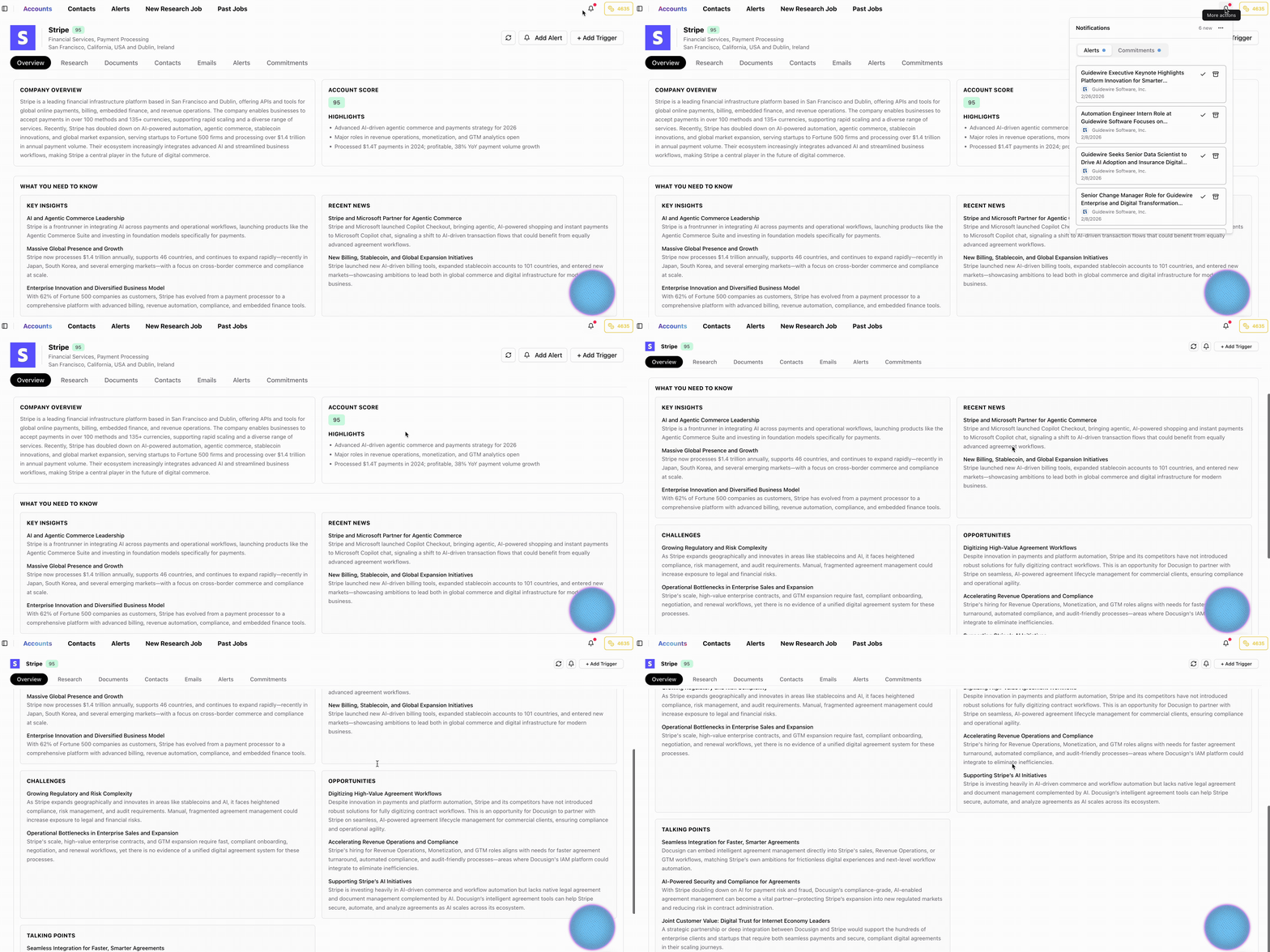
Account research that runs continuously. ChatAE researches your accounts against your selling motion and surfaces buying triggers — not raw news. Every insight includes the trigger, why it matters for your deal, and sourced evidence.
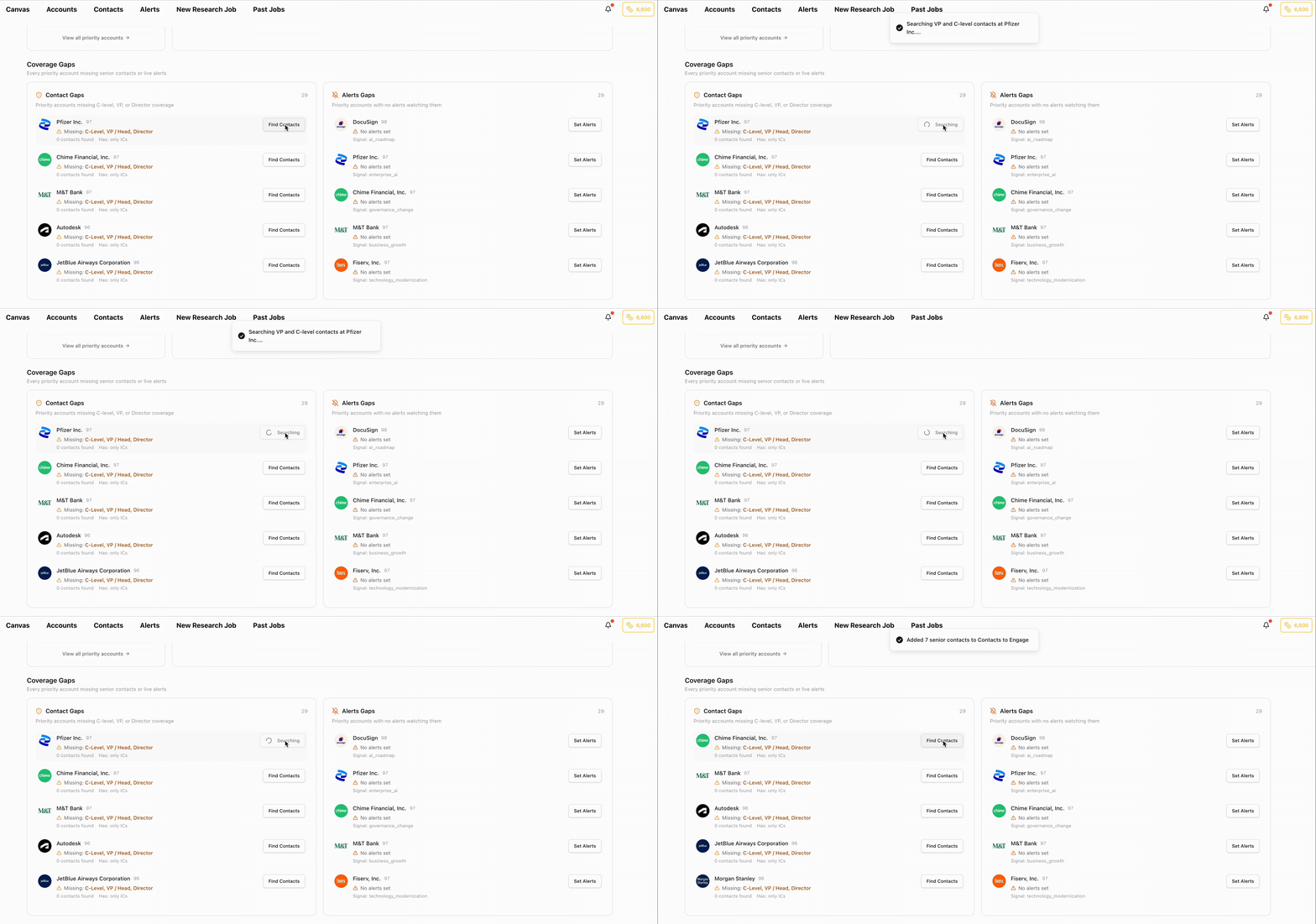
Contact enrichment in the background. Click Find Contacts on any account and ChatAE runs waterfall enrichment across multiple providers. Senior contacts appear in your workspace with verified data, ready for outreach. No tab switching, no manual entry.
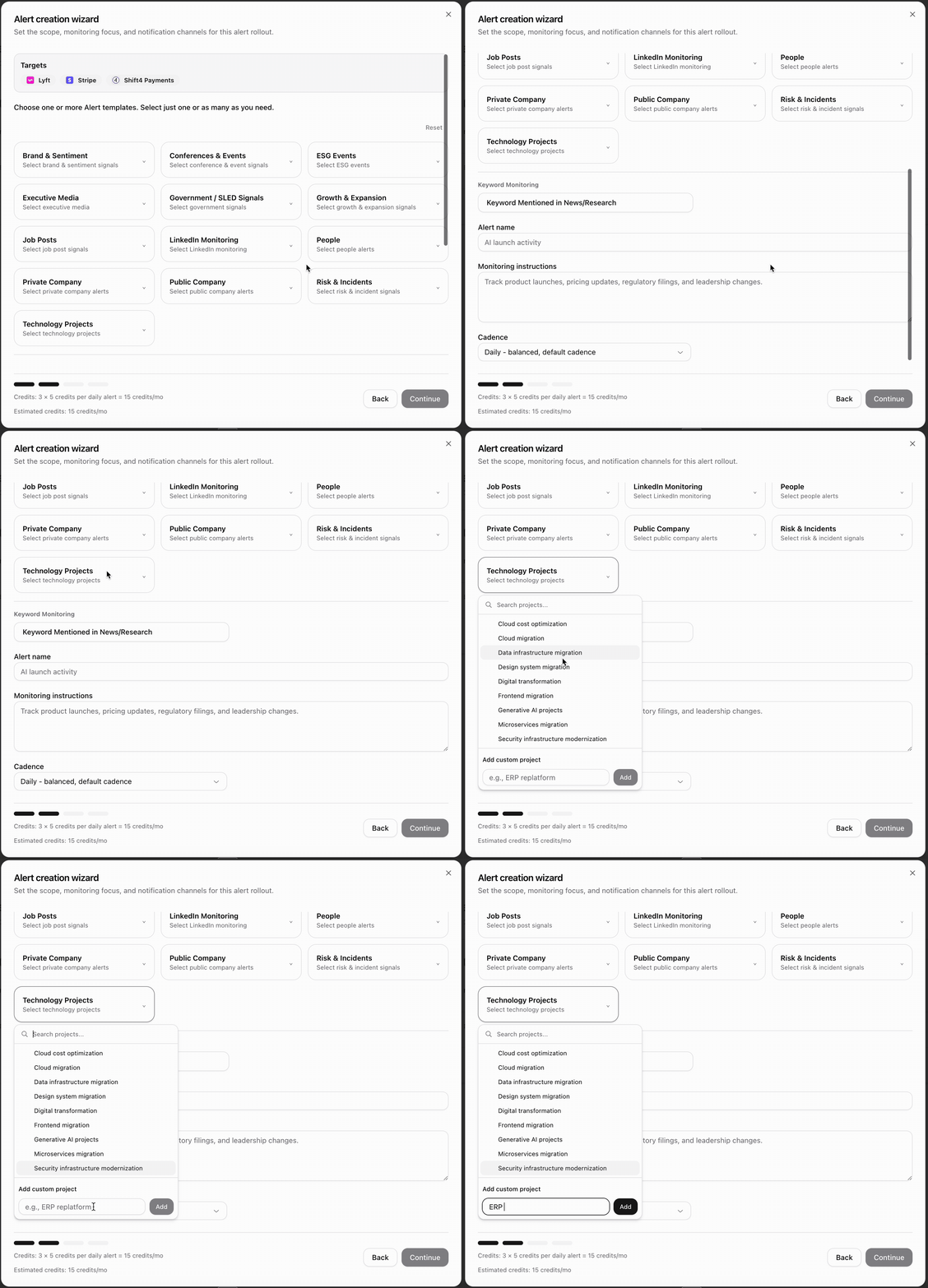
Context-aware alerts that watch your accounts. Set alerts in 30 seconds — ChatAE evaluates every event against your triggers and delivers only what matters, where you work (Slack, email, or in-app).
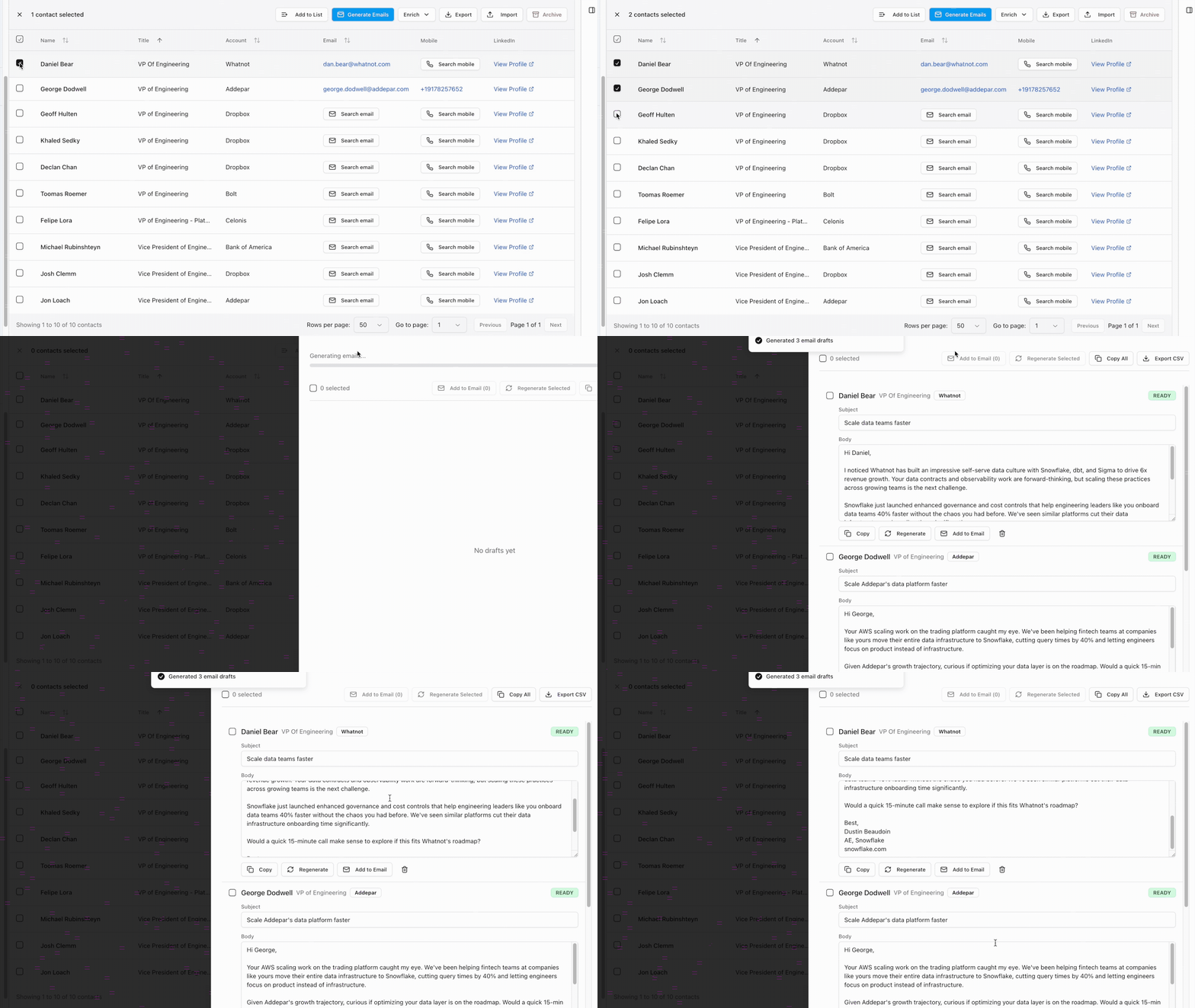
Email drafts grounded in real context. Generate outreach that references specific account triggers, adapts to your voice, and is ready to review — not template fill-ins, not spam.
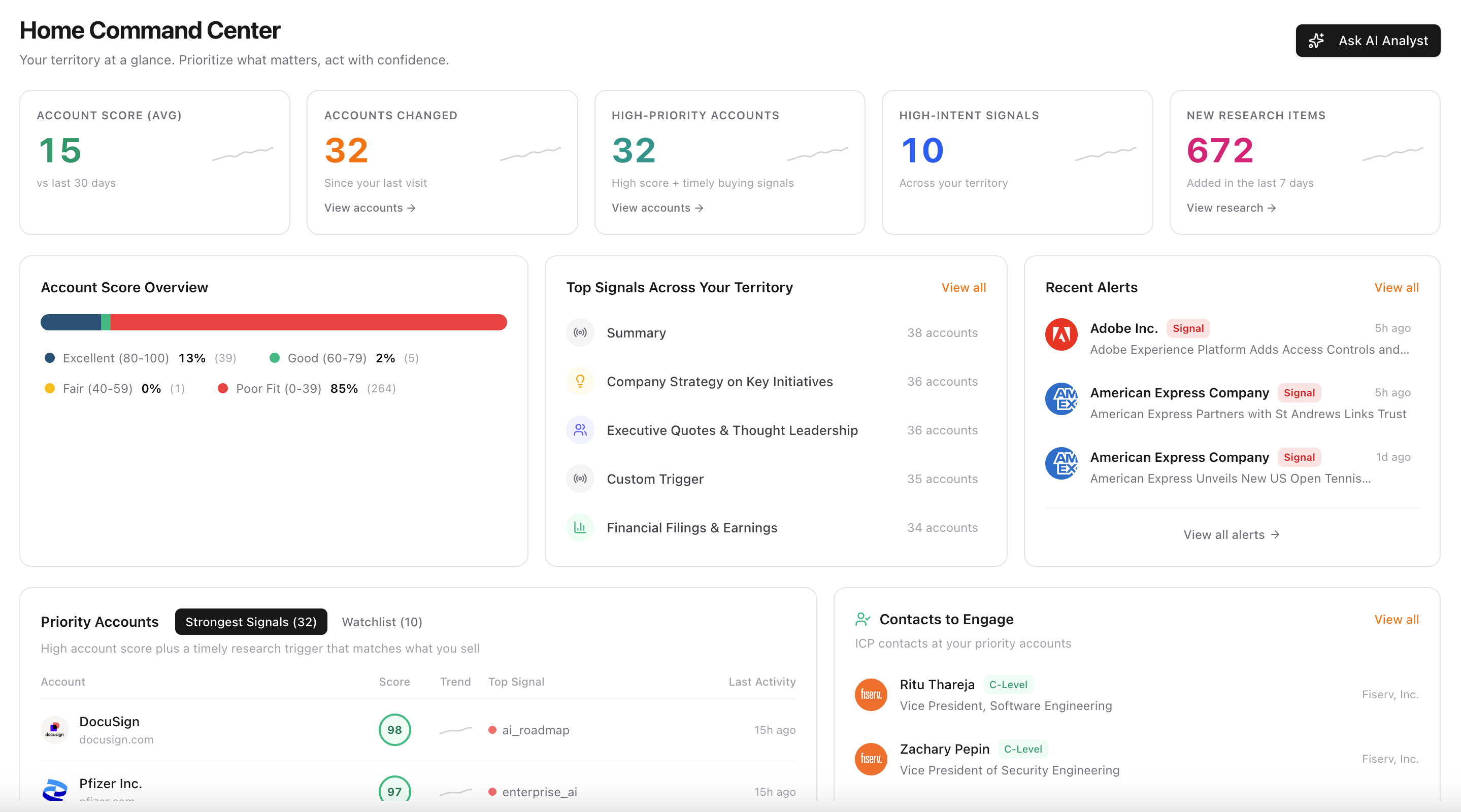
Daily prioritization without a spreadsheet. Home Command Center ranks your accounts by fit and signal freshness every morning. Open it, read the plan, and start selling — no export, no sorting, no guesswork.
CRM hygiene as a byproduct. Account context stays current because ChatAE maintains it through research and alerts. You don't update the system — the system updates itself.
Why "Prompt-Light" Matters
Most AI tools for sales require significant setup: custom prompts, workflow configuration, integration mapping, and ongoing maintenance. The complexity shifts from manual admin work to managing the AI system itself.
ChatAE is designed to be prompt-light. You tell it what you sell, who you sell to, and what events create selling opportunities. From there, it handles research, enrichment, monitoring, drafting, and prioritization without requiring you to engineer prompts or build automations.
You don't configure workflows. You don't write system prompts. You don't manage integrations. You set your context once and the system works from it.
That's the difference between a tool that can do things if you set it up correctly, and a system that does them because it already understands your motion.
One Platform Instead of Six Tools
Every use case above — research, enrichment, alerts, drafting, prioritization, CRM maintenance — lives in one system. Research feeds into alerts. Alerts update prioritization. Prioritization drives contact discovery. Contact context grounds email drafts. Everything connects because it was built to work together.
You don't become the integration layer. You don't copy context between tools. You don't manage six subscriptions, six logins, and six different data models.
You open one platform, and the admin work is already done.
The Bottom Line
SDRs lose most of their day to work that doesn't require human judgment. AI can automate that layer — but only if the system is integrated, context-aware, and keeps humans in control of the work that matters.
The solution isn't six AI tools bolted together. It's one platform that handles research, enrichment, monitoring, drafting, prioritization, and data maintenance as a connected system.
That's what ChatAE is built to do. Not to replace the SDR. To give them their day back.